
GameBoost
3.6.4.2018
Size: 3.84 MB
Downloads: 16898
Platform: Windows (All Versions)

Most computer users who are passionate about computer games have some really fast computers, which allow them to play the newest games in optimal conditions. The problem is that Windows is not perfectly optimized for games so, even if you have a very fast computer, some of your games may not work as expected. But when installing the GameBoost application, things change.
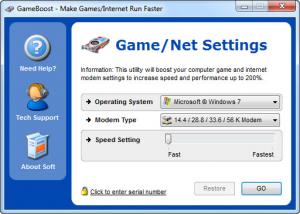
That's because GameBoost can optimize Windows settings which are related to gaming and can make your games run faster than ever, giving you an entire new experience. After installing and running the application, the user will be presented with a very simple interface, which allows him to select the desired operating system version, the speed of the Internet connection and the optimization level that should be achieved.
GameBoost supports almost any Windows version and it's compatible with any Internet connection speed. After making all the desired settings, the optimization process can be launched using a single mouse click. After the process is over, the user will notice a significant improvement in the speed of his games. For people who aren't familiarized with the program's functionality and features, there is a comprehensive help manual available.
Pros
It allows you to optimize your Windows settings regarding gaming, by using a simple interface and by making some intuitive settings. Besides that, almost any Windows version is supported and any Internet connection speed. Furthermore, there is a comprehensive help file available.

Cons
The program's interface may be considered too simple by some users. Besides that, the demo version includes some limitations. GameBoost allows you to easily improve your gaming speed, by tweaking Windows settings regarding gaming.

GameBoost
3.6.4.2018
Download
GameBoost Awards

GameBoost Editor’s Review Rating
GameBoost has been reviewed by Jerome Johnston on 15 Aug 2012. Based on the user interface, features and complexity, Findmysoft has rated GameBoost 4 out of 5 stars, naming it Excellent







